NEWSLETTER

Tee Time Wait Lists: Turning Cancellations into Confirmations

January 2026

Instant visibility for members. Better use of every tee time.

At the end of 2025, we introduced a new wait list feature called Notify Only. Many of our golf professionals and partners were seeking an effective way to notify members when a tee time becomes available, rather than getting assigned automatically or manually by a staff member.

This month, we share the thinking behind Notify Only, who it may benefit, and how it fits alongside other wait list customizations. Let’s dive in!

What is "Notify Only"?

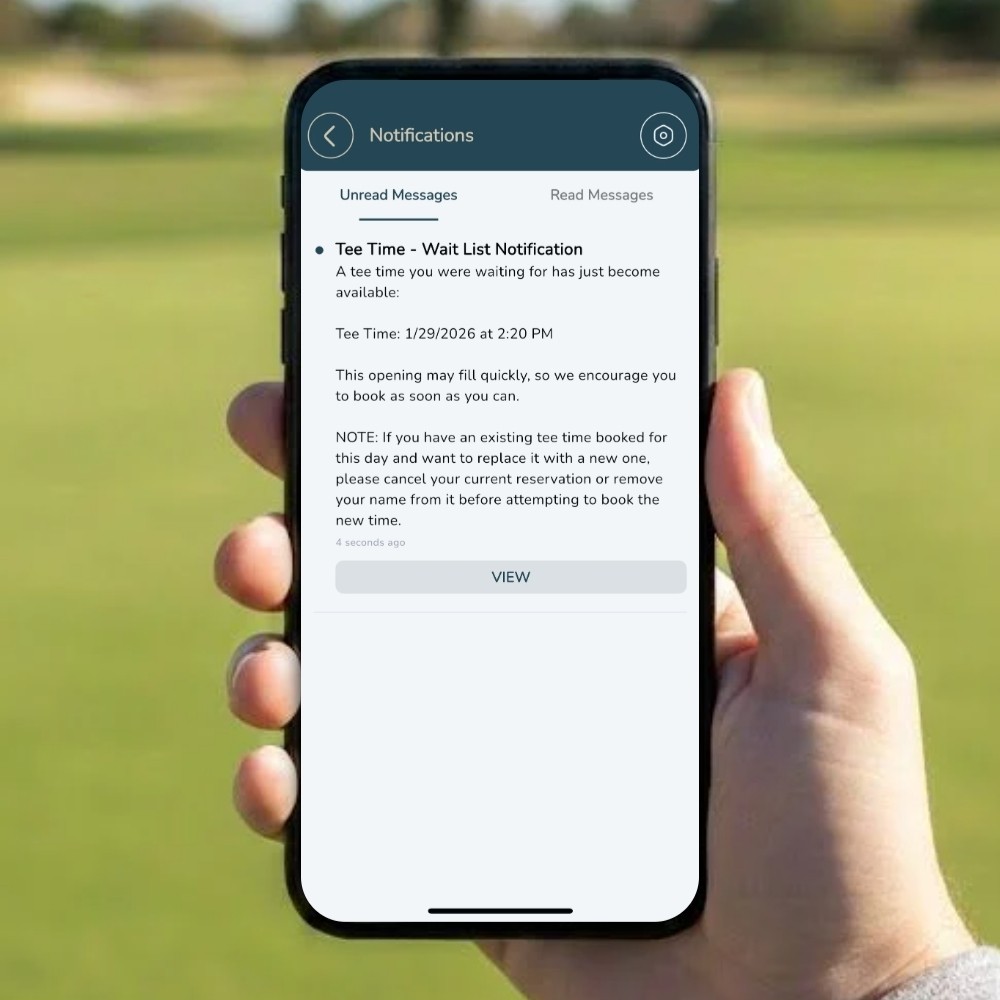
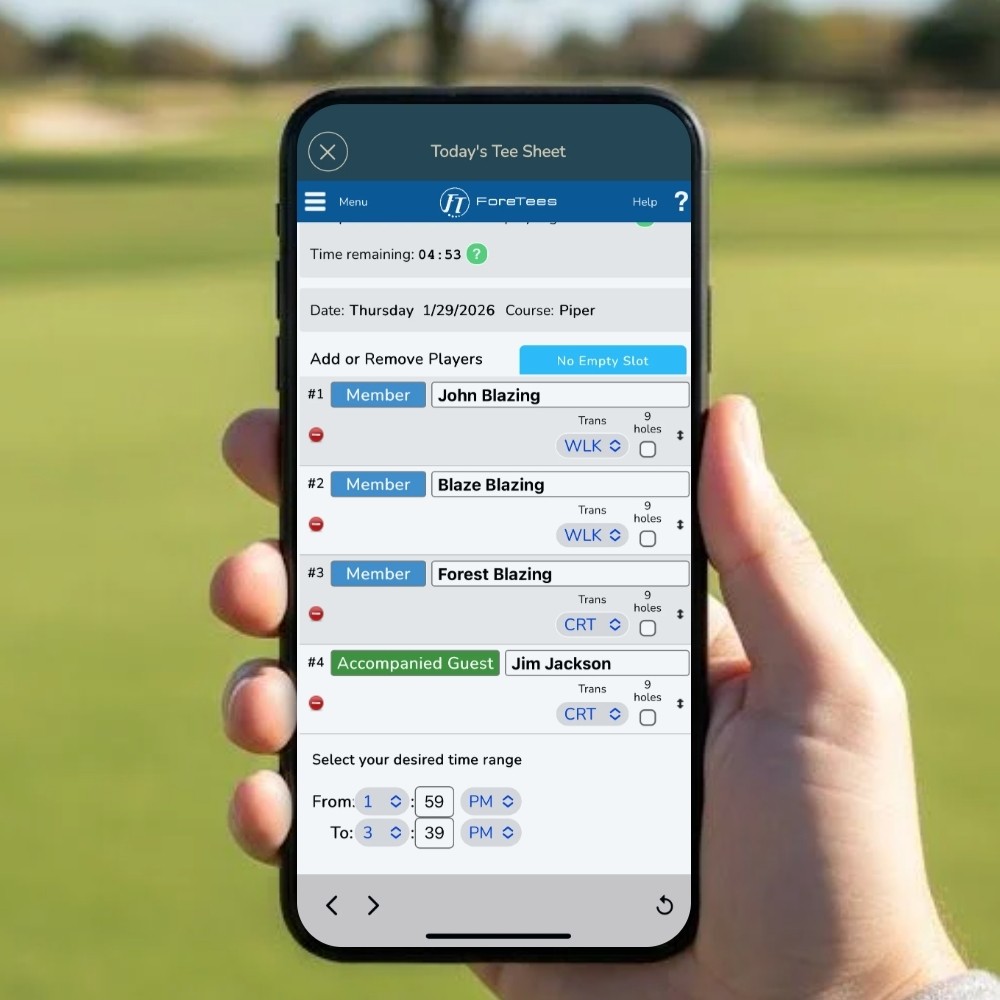
During busy hours, staff can build a wait list that notifies member(s) when a player slot or tee time becomes available. Member(s) choose a time range they desire and once a time within that range opens, they will be notified instantly by email and receive a push notification from the ClubCentral app. The notification will prompt the member(s) directly into the tee sheet page. First come, first serve.

During busy hours, staff can build a wait list that notifies member(s) when a player slot or tee time becomes available. Member(s) choose a time range they desire and once a time within that range opens, they will be notified instantly by email and receive a push notification from the ClubCentral app. The notification will prompt the member(s) directly into the tee sheet page. First come, first serve.

“Monitor” filled slots and get notified when a time becomes available

Fair way to seamlessly fill cancellations during peak hours

Less staff involvement

The images below display the wait list request page (left) and the notification center (right).
For an even more automated option:

Staff can build a wait list that will automatically assign members to a tee time inside their desired time range. Member(s) choose a time range. If a time within that range opens, they will be automatically added to that time, which then triggers a reservation confirmation email and push notification in the ClubCentral app. Depending on your cancellation policy, member(s) will still be able to modify their tee time assignment.

Why Implement a Wait List?

Wait lists help club staff reduce tee-time waste and keep the tee sheet filled with committed players. We also wanted to reduce the time and energy it takes for your members to snag an open tee time.

Customizations include:

  • Allow members to make requests on the tee sheet or have it accessible to the pro shop only

  • Configurable to certain days and/or times, or have it available all the time

  • Can be set to auto-assign, which automatically books the first request on the wait list OR to notify only, sending a push notification and email to the member that a tee time has opened.

Wait lists help club staff reduce tee-time waste and keep the tee sheet filled with committed players. We also wanted to reduce the time and energy it takes for your members to snag an open tee time.

Customizations include:

  • Allow members to make requests on the tee sheet or have it accessible to the pro shop only

  • Configurable to certain days and/or times, or have it available all the time

  • Can be set to auto-assign, which automatically books the first request on the wait list OR to notify only, sending a push notification and email to the member that a tee time has opened.

🗓️ Managing Peak Hours Demand

Early-morning weekend windows. For example, 7:00am–11:59am on Saturdays and Sundays. Notify Only will allow members to stay informed when cancellations occur over their desired playing time, effectively notifying and filling open tee times.

📈 Creating "Upgrade Lists"

Members book what’s available, then join a Notify Only list for their ideal time window. When something opens up, they decide if they want to switch!

Members book what’s available, then join a Notify Only list for their ideal time window. When something opens up, they decide if they want to switch!

📋 Less Manual Work For Staff Users

“This will save time for the member. No need to constantly keep checking the tee sheet to see if a tee time becomes available. Also, it helps the staff because they don’t have to keep track of this on paper anymore.” - ForeTees ProSupport

📋 Less Manual Work For Staff Users

“This will save time for the member. No need to constantly keep checking the tee sheet to see if a tee time becomes available. Also, it helps the staff because they don’t have to keep track of this on paper anymore.” - ForeTees ProSupport

🛠️ Quick Setup

  1. Go to System Config > Wait List Setup > Build New Wait List

  2. Enter the Name, Date Range, Time Frame, and Active Days

  3. Under Member Access to Tee Sheet, select your Member Access to Tee Sheet permission

Pro Tip:

We recommend enabling “Disable Check for Existing Reservations.”

This allows members who already have a booking to still receive alerts for better times.

Example:
A member books 4:00 PM but wants 9:00 AM.
With this setting enabled, they’ll receive the alert if morning time opens. Without it, they won’t, since they may be exceeding their daily play limit.

If you would like help setting up a wait list or want to explore your options, please let us know. We’re happy to help!


Upcoming Event!

We are excited to attend several key industry events this winter. A great time to connect with golf and club professionals alike, share insights, and explore how we can better serve our customers in 2026 and beyond.

Visit us at Booth #851

CMAA 2026

CMAA 2026

CMAA 2026

World Conference & Club Business Expo

World Conference & Club Business Expo

World Conference & Club Business Expo

February 17-21
Anaheim, CA

February 17-21
Anaheim, CA

February 17-21
Anaheim, CA

What to expect:

  • Meet the ForeTees team in person

  • See live demos

  • Dive into key features like Mobile Food Ordering, Point of Sale, Dining & Events Reservations, Mobile Key, and more!

  • Get the latest on upcoming developments, powerful integrations, and practical tips to give you greater control over your operations

Whether you’re looking to optimize your current setup or explore what’s next, this is your chance to connect directly with us.

Request a Meeting

Stay tuned for more information on upcoming events on our LinkedIn!

We Value Your Feedback!

At ForeTees, we are always seeking to improve and deliver the best possible experience for you, even when it comes to our monthly newsletter.

Thank you in advance for taking the time to complete this feedback survey.

Subscribe
to our
Newsletter

Subscribe to our Newsletter

Stay up to date with all-things ForeTees with our monthly e-newsletter.

Connect with us on LinkedIn

Copyright © 2002 – 2026 ForeTees, LLC Private Club Software. All rights reserved.

|

|